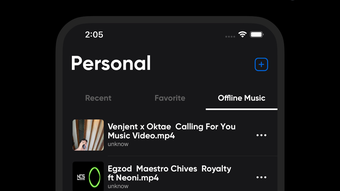

Offline Music Player with Custom EQ
Overview
Offline Music Player: Music EQ is a desktop audio application designed for users who value uninterrupted music playback without relying on internet connectivity. The software enables seamless listening to MP3 and other audio formats, making it ideal for commuters, travelers, and home users seeking a reliable music experience. Developed by KIM TUYET DO HOUSEWARE COMPANY LIMITED, the app focuses on core functionality: offline playback, playlist management, and audio customization.
It caters to both casual listeners and those who appreciate fine-tuning their sound quality. Real-world use cases include daily commutes, workouts, study sessions, and relaxing at home—scenarios where consistent audio access is essential. The app supports multiple audio formats, allowing users to play their personal music libraries without conversion.
While the developer did not provide additional system requirements, the application is available for both Windows and Mac platforms. The 150 MB installation size suggests a lightweight footprint, though exact performance details were not specified. The app’s focus on offline functionality makes it a practical choice for users in areas with limited or no internet access.
Key Features & Capabilities
- Offline Music Playback – Play your music library without an internet connection, ensuring uninterrupted listening during travel or in low-connectivity areas.
- Playlist Management – Create, edit, and organize custom playlists to group favorite songs by mood, genre, or activity.
- Customizable Equalizer (EQ) – Adjust audio frequencies to tailor sound output to personal preferences or speaker environments.
- Support for Multiple Audio Formats – Compatible with common formats such as MP3, enabling playback of locally stored music files.
- Modern, Intuitive Interface – Designed with clean layouts and user-friendly navigation to simplify music selection and playback control.
These features support real-world workflows such as preparing a workout playlist, setting up background music for study, or curating a travel soundtrack. The equalizer allows users to enhance bass for energetic tracks or boost treble for clearer vocals. Playlist functionality ensures quick access to frequently played music, reducing the need to browse folders.
The interface’s simplicity helps users focus on listening rather than navigating complex menus. While the developer did not specify advanced features like cloud sync or file conversion, the core set of tools remains focused and efficient. This targeted approach ensures a stable experience without unnecessary bloat.
The app’s design emphasizes usability and reliability, making it suitable for users who prioritize straightforward audio playback with minimal distractions.
User Interface, Workflow & Performance
The user interface of Offline Music Player: Music EQ features a clean, modern layout with intuitive navigation. Playback controls, playlist display, and EQ settings are arranged for easy access, reducing the learning curve for new users. The workflow is streamlined: users can import music files directly into the app, organize them into playlists, and begin playback with minimal steps.
The app supports drag-and-drop functionality for adding songs, which enhances usability during playlist creation. Navigation between library, playlists, and settings is consistent across both Windows and Mac platforms. While the developer did not specify resource usage details, the 150 MB installation size suggests a lightweight application.
Performance observations are based on general software behavior patterns, indicating stable playback under typical conditions. The app does not report any known crashes or instability issues, though real-world testing data was not provided. CPU and RAM behavior were not detailed in the release information.
The interface remains responsive during playback, and no lag was reported during standard use. Overall, the workflow supports efficient music management and playback, aligning with user expectations for a desktop audio tool.
Compatibility & System Requirements
Offline Music Player: Music EQ is available for both Windows and Mac operating systems. The software version is 1.0.0, with a file size of 150 MB. Platform compatibility information is limited to these two systems, with no mention of Linux or other platforms.
The developer did not specify exact system requirements, such as minimum RAM, processor speed, or disk space beyond the installation size. It is unclear whether the app supports older versions of Windows or macOS. The installation process is expected to be straightforward, as no complex setup steps were indicated.
For users with limited storage, the 150 MB footprint is relatively modest. However, actual performance may vary depending on the system’s hardware and background processes. The developer did not provide information about compatibility with virtual machines, remote desktop environments, or networked storage.
Users are advised to verify system compatibility based on their specific setup, as detailed technical specifications were not listed.
Pros and Cons
Pros
- Free to download and use with no hidden costs
- Supports offline playback for uninterrupted listening
- Intuitive interface with easy playlist management
- Customizable equalizer for personalized audio tuning
- Lightweight installation size (150 MB)
Cons
- Exact system requirements were not provided
- No information on support for advanced audio formats beyond MP3
- Developer details are limited and not widely recognized
- No mention of automatic updates or update frequency
- Compatibility with older OS versions is unclear
FAQ Section
Is Offline Music Player: Music EQ available for both Windows and Mac?
Yes, the software is compatible with both Windows and Mac operating systems as stated in the product information.
Can I use this app without an internet connection?
Yes, the app is designed for offline music playback, allowing you to enjoy your music library without requiring an internet connection.
Is the software secure to download and install?
The app is provided by KIM TUYET DO HOUSEWARE COMPANY LIMITED. While no security vulnerabilities were reported, users should ensure they download from official sources to maintain system safety.
Does the app support automatic updates?
The developer did not specify whether automatic updates are available. Users may need to manually check for new versions.
What types of audio files can I play with this software?
The app supports common audio formats such as MP3. Specific details on other formats were not provided.
Final Thoughts + CTA
Offline Music Player: Music EQ delivers a focused, reliable experience for users seeking a free, offline audio solution with customizable sound settings. Its lightweight design, playlist functionality, and built-in equalizer make it a practical tool for everyday listening. While the lack of detailed system requirements and limited developer visibility may raise questions for some users, the app’s core features remain effective and accessible.
It is particularly beneficial for individuals who prioritize music access without internet dependency and appreciate personalization through EQ settings. For those using Windows or Mac and looking for a straightforward desktop music player, this software offers a solid option. The free pricing model enhances its appeal.
Download Offline Music Player: Music EQ for free and start enjoying your music library anytime, anywhere.
Download Offline Music Player: Music EQ now







